TMS for Logistics Service Providers
Faster customer invoicing | Clear carrier cost allocation | Margin by order | Visibility into uninvoiced work
Manage forwarding, carrier execution, settlement, and customer invoicing inside Microsoft Dynamics 365 Business Central.
Built for freight forwarders, brokers, and 3PL teams managing third-party cargo.
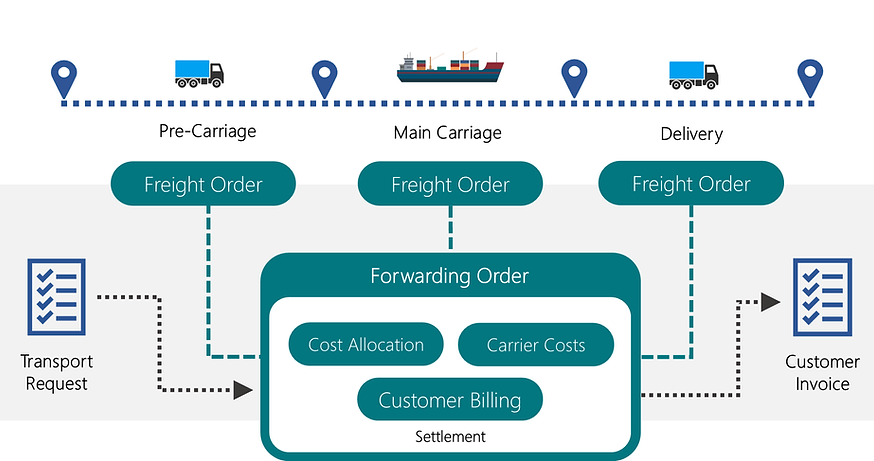
From Forwarding Order to customer invoice
Manage the full transport job inside Business Central — plan stages, execute carriers, allocate actual costs, and protect margin in one workflow.
Step 1 — Forwarding Order / Capture the job
Keep parties, cargo, dates, stages, documents, and commercial terms in one transport record.

Step 2 — Freight Order / Execute each leg
Split the job into stages and assign the right carrier, pay-to vendor, route, timing, and execution details for every leg.

Step 3 — Settlement / Allocate actual costs
Link purchase invoice lines to transport charges, reconcile supplier costs, and keep financial control by transport order.
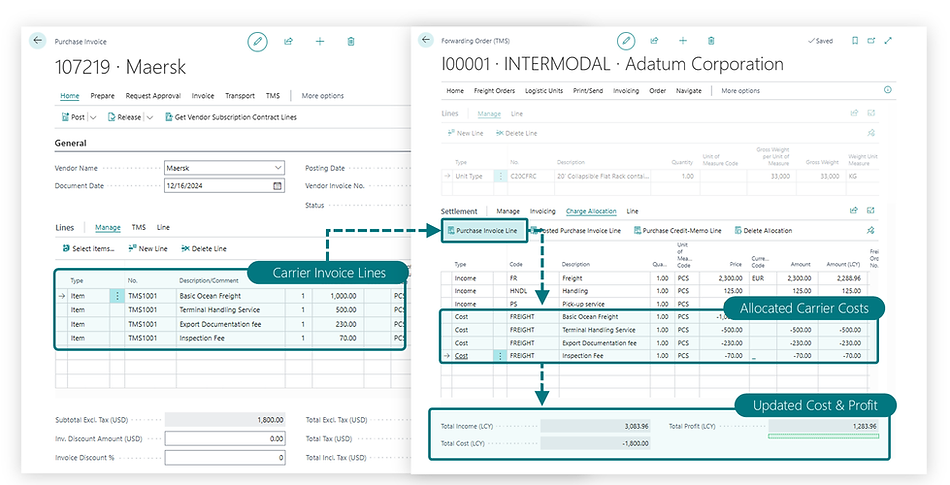
Step 4 — Billing / Invoice and monitor margin
Create customer invoices and track expected profit, uninvoiced work, and profitability by order.

Operational and financial control
-
Forwarding Order Management - Capture the full transport job — parties, cargo, dates, stages, commercial terms, and customer-facing documents — in one order record.
-
Freight Order Execution - Run each leg with the right carrier and pay-to vendor, with route, timing, vehicle, and driver control when needed.
-
Settlement & Charge Allocation - Match actual supplier costs to transport jobs and distribute charges accurately across orders.
-
Customer Invoicing & Profitability - Invoice directly from the transport workflow, track uninvoiced work, and monitor expected profit and margin by order.
Why logistics providers choose LSP TMS
LSP TMS combines multi-stage forwarding, carrier execution, settlement, and customer invoicing in one Business Central workflow.
-
Multi-stage forwarding - Plan and run complex transport jobs as linked stages inside one transportation process.
-
Third-party carrier execution - Assign different carriers and pay-to vendors by stage, or combine subcontracted capacity with your own fleet when needed.
-
Purchase invoice line allocation - Link actual supplier invoice lines to the right transport order and reconcile planned vs. actual cost.
-
One-click invoicing from the Forwarding Order - Create customer invoices directly from the transport workflow using all non-invoiced income lines.
-
REST API & Power BI access - Support external system connectivity and reporting scenarios when transport data needs to move beyond the core workflow.
Financial Control
Settle costs, invoice customers, and protect margin
Use service and charge lines, link purchase invoice lines to transport charges, allocate actual costs, control uninvoiced work, and monitor expected profit by order.

Workflow Governance
Configure the workflow to match your business model
Define order types, stage structures, status rules, and document requirements for each workflow — so your team follows a consistent process from job creation through invoicing and posting.

Stage profiles and status rules help you structure each transport workflow in line with your business process.
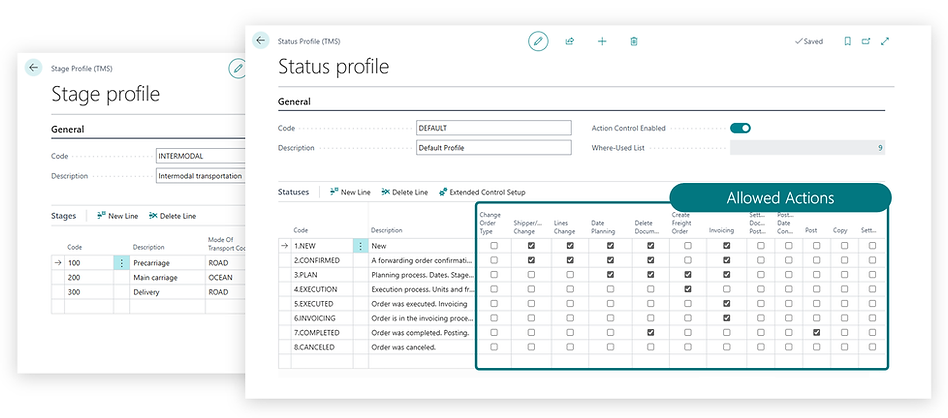
Document and attachment control helps your team collect required files, avoid missed tasks, and keep multiple managers aligned.


Checklist functionality helps managers avoid missing tasks and keeps multiple managers aligned in their work.

Detailed Review
Frequently asked questions
Can we use subcontracted carriers only?
Yes. LSP TMS supports third-party carriers and pay-to vendors, so you can manage subcontracted transportation without relying on your own fleet. You can also combine subcontracted carriers with your own vehicles and drivers when needed.
Can we run multi-stage jobs with different carriers?
Yes. Stage profiles define the transport flow, and each leg can be executed by a different carrier with its own schedule, mode of transport, vendor, and execution details.
How are supplier invoices allocated to transport orders?
Supplier costs are entered in Business Central and linked to TMS charges. Purchase invoice lines can then be allocated directly to the relevant transport order from the settlement workflow. Costs can be distributed evenly, by weight, by number of logistic units, or by selected orders.
Can we invoice customers directly from the transport workflow?
Yes. Customer invoices can be created directly from the Forwarding Order based on non-invoiced Income lines, in the ordering party’s currency, using standard Business Central documents.
Сan the workflow be configured for our business model?
Yes. You can configure forwarding order types, stage profiles, status profiles, service sets, charge sets, content sets, default parties, and document control settings to match your process.
Integrations
Keep LSP TMS connected to external order sources and management reporting when transport data needs to move beyond the day-to-day workflow.
-
Order Management REST API for external systems
Use API-based connectivity when transport orders or related data need to be exchanged with external systems.
-
Power BI and API-based reporting access
Support Power BI and other reporting scenarios when operations or finance data needs to be shared outside the core transaction flow.
-
Profitability reporting in an additional currency
Recalculate income, cost, and profit in an additional reporting currency for group-level visibility and management reporting.
Pricing
-
LSP TMS uses subscription pricing.
-
Pricing and currency vary by region and country in AppSource.
-
More detailed information can be found on the solution page in AppSource.

Installation
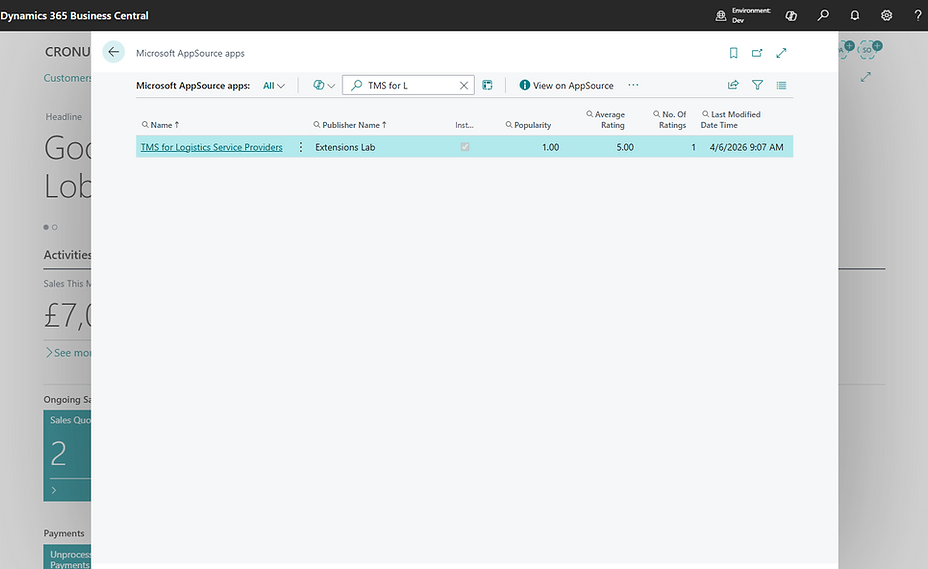
TMS can be installed into your Business Central directly from AppSource by your system administrator.
Or directly from Business Central itself